Verify kakobuy Eyewear Case Coupon Freshness
First Clarify the Settlement Decision That Eyewear Case Coupon Verification Must Solve
Eyewear case coupon verification isn't about copying old records again; it's about determining, before submitting an order, whether the coupon currently on the page still exists, applies to products like eyewear cases, and can actually reduce the amount due or shipping cost at checkout.
This method is suitable for users who have already found the relevant website-based Spreadsheet, are preparing to organize the information into Google Sheets, and need to re-check timeliness before placing an order. It's not suitable for treating search summaries, old screenshots, or historical records that haven't been re-opened as current coupons.
It's recommended to record the verification date, destination country, currency, page URL, and coupon's applicable conditions all together. Screenshots can only prove that a page displayed certain content at the time of capture; they cannot independently prove that the coupon is still usable now. 🔎
What Current Information Should Be Looked for in the kakobuy Website Spreadsheet
First open the provided Kakobuy official page or official materials, then confirm whether the page can be accessed normally. Platform operation instructions can only be based on the official visible page and provided official screenshots; the article publishing site cannot be treated as the Agent's official website, and categories, tags, or promotional text on the article page cannot be inferred as official features.
When looking up, focus on recording the following types of information:
- Whether the product category or Spreadsheet entry for eyewear cases can still be opened
- Whether the page displays the product name, basic information, and currently visible coupon prompts
- Whether the coupon is a product coupon, shipping coupon, or account benefit received after registration
- Whether minimum spending, applicable regions, validity period, claim conditions, or exclusions are stated
- Whether the page has redirects, blank content, invalidity, or only tags without verifiable content
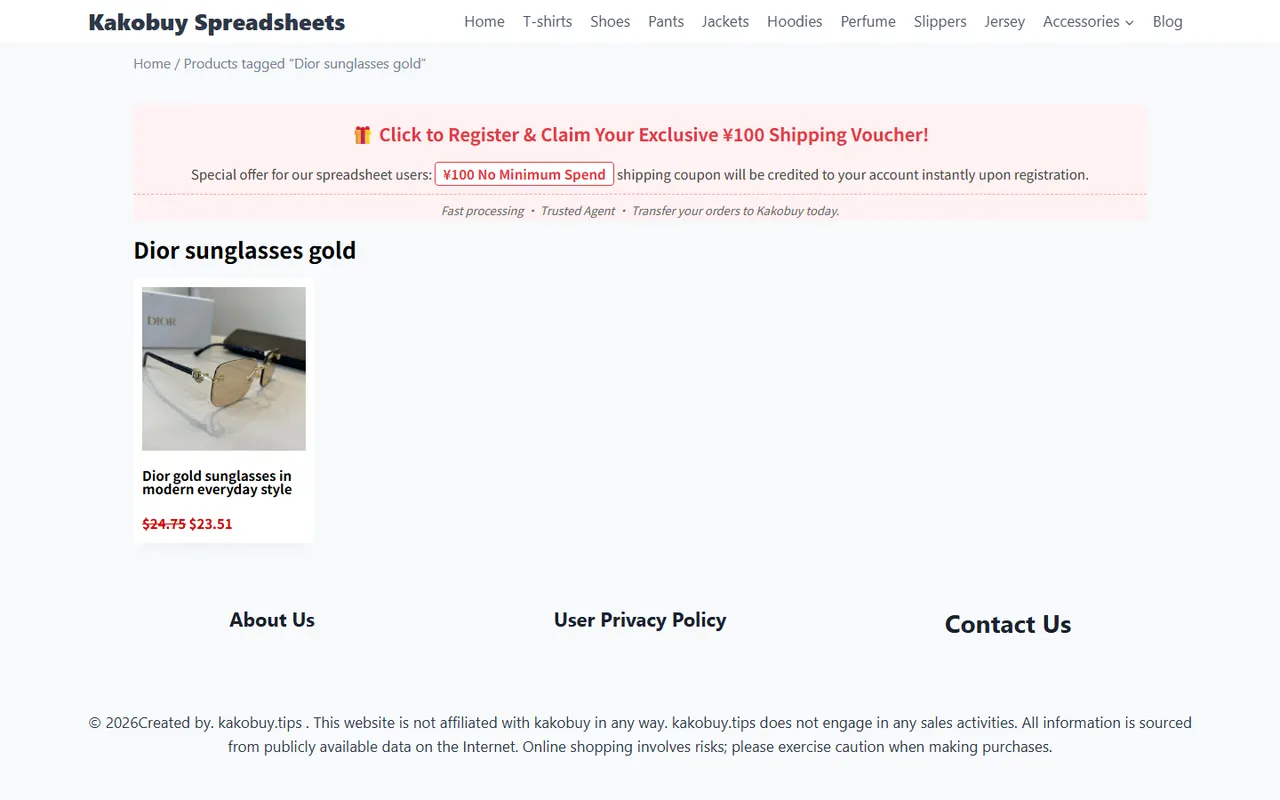
The specified screenshot can serve as page-level reference evidence, showing site navigation, product tabs, and promotional areas for shipping coupons received after registration. It cannot replace checkout page verification, nor can it prove that every eyewear case meets the coupon conditions. 📌
How to Record Page Date, Link, and Coupon Conditions in Google Sheets
Google Sheets serves as a verification ledger here and should not be mistaken for the Kakobuy official backend. Each time after opening the page, first add or update a row, keeping the original page URL and this verification time.
Recommended fields are as follows:
| Field | Recording Method | Purpose |
|---|---|---|
| Page Name | Use the visible page name | Prevent mixing up different pages |
| Page URL | Paste the actually opened URL | Convenient for next review |
| Verification Date and Time | Use local clear time | Determine if record is too old |
| Coupon Type | Product, shipping, account benefit, or unknown | Avoid mistakenly mixing coupon categories |
| Applicable Conditions | Excerpt verbatim then briefly summarize | Support judgment before checkout |
| Evidence Status | Visible, partially visible, to be verified, or invalid | Distinguish facts from speculation |
| Next Review Time | Fill in according to order plan | Avoid long-term use of old records |
Don't just write "has coupon" or "cheap." If the page doesn't show validity, threshold, or applicable scope, clearly fill in "page does not show" instead of completing it yourself. 📝
Steps for Updating and Checking Website Pages and Spreadsheet Records
Step one, open the original page URL saved in the spreadsheet, confirm the page is still accessible, and check if it has been redirected to other content. If the URL is already invalid, first change the status to "to be verified" or "invalid," don't directly delete the old row.
Step two, compare item by item with the page's visible information: page name, coupon text, claim method, applicable conditions, and page update time. When the page doesn't show certain information, write "not shown" in the spreadsheet, don't fill it with content from other pages.
Step three, save this verification time separately from the previous record. Only when the same coupon appears again on the current page and applicable conditions do not conflict can the status be updated to "currently visible."
Step four, if the coupon requires registration, login, or claiming, record whether it belongs to "page promotion" or "claimed in account." The former cannot be treated as already credited, and the latter still needs to be confirmed at checkout whether it is applied by the system.
Step five, before entering checkout, open the record again to confirm no new thresholds, expiration dates, destination country restrictions, or shipping rule changes have appeared. This recheck should be done before submitting the order, not once when organizing the spreadsheet. ✅
How to Separately Verify Product Price, Coupon Threshold, and Exclusions
The product price, coupon threshold, and final shipping cost for eyewear cases are three different facts. They should be saved in separate columns in the spreadsheet, avoiding writing estimated savings as confirmed results upon seeing a coupon prompt.
Product price should be based on currently visible page information; coupon threshold needs to be checked for minimum spending, specified products, specified accounts, or specified routes; final shipping cost should be based on order weight, destination, packaging method, and the result displayed at checkout. If any item lacks evidence, it can only be marked as "to be verified."
Judgment can be made with the following logic:
- Page has coupon text but no applicable scope: record as page visible, not confirmed usable
- Page has applicable scope but order does not meet threshold: record as not applicable
- Page shows claimable but account not confirmed credited: record as not claimed
- Spreadsheet has old record, current page has no corresponding content: keep historical record and mark as invalid or to be verified
- Checkout page shows coupon not applied: prioritize checkout page, pause use of old records
Don't write page promotion, spreadsheet records, and checkout results in the same cell. Separate records make it clear at which step the coupon fails. ⚠️
What to Do When Links Are Broken, Records Expired, or Coupon Codes Missing
If the link cannot be opened, first keep the original record and note the check time, error symptom, and whether a redirect occurred. Don't infer that the coupon has been canceled just because the page cannot be opened; similarly, don't continue treating it as a current coupon just because it was previously saved in the spreadsheet.
If the page still opens but there is no coupon code, record the claim method and the visible scope of the page text. The absence of a coupon code does not necessarily mean the coupon doesn't exist, but before completing account claiming or checkout verification, the savings amount should not be counted into the budget.
If a record is found expired, create a new verification row or update the version field, keeping the old date and old status. This allows tracking changes and avoids repeated use of outdated information.
If the page only shows conceptual promotion and lacks product applicable conditions, the safest handling is to set the status to "to be verified" and confirm with official channels before checkout. Do not expand so-called savings through undervaluing, splitting orders to avoid taxes, or evading inspections.
Which Facts Can Be Written into the Spreadsheet and Which Can Only Be Marked as To Be Verified
Facts that can be written into the spreadsheet must come from the currently visible page, official materials, account-displayed status, or checkout page. These include page name, actual URL, verification time, visible coupon text, explicitly stated thresholds, and whether the checkout page shows the coupon.
Situations that can only be marked as to be verified include: the page does not show validity period, whether the product falls within applicable scope is unclear, whether the coupon requires a specific account is unclear, screenshots are inconsistent with the current page, the page cannot be opened, and estimated shipping has not been confirmed at checkout.
The "savings amount" in the spreadsheet should ideally be split into "page displayed coupon," "estimated savings before checkout," and "actual savings after checkout." Before the actual amount is shown, the first two should not be written as realized results.
Final Action: Complete the Eyewear Case Coupon Freshness Recheck Before Checkout
Before checkout, complete the final recheck in the order of "open page, check conditions, check account, enter checkout, save results." Confirm that the page URL has not changed, the record date is still valid, destination country and currency are consistent, the eyewear case meets applicable conditions, and the checkout page indeed shows the coupon or clearly does not show the coupon.
A qualified verification result should answer four questions: where does this coupon come from, when was it seen, what conditions does it apply to, and whether it was ultimately applied at checkout. If any of these questions cannot be answered, keep the status as "to be verified."
This method may save a product or shipping coupon clearly displayed on the page, but it will also increase the time cost of organizing records and secondary rechecks; at the same time, it cannot eliminate the risk of temporary coupon changes, account restrictions, route restrictions, or checkout discrepancies. It is suitable for users who need to batch organize Spreadsheets and wish to retain evidence before ordering; if the order amount is very low, coupon conditions clearly do not apply, or the recheck cost is higher than the possible savings, it is not recommended to delay checkout for the sake of chasing uncertain coupons.