Mobile Shoe Box Logging: Site vs Google Sheets
Mobile Shoe Box Logging: Site vs Google Sheets
What Shipping Tasks Does Logging Shoe Box Decisions on Mobile Solve?
This guide is for users who already have multiple pairs of shoes in the warehouse, are ready to submit shipping requirements, but haven't clearly recorded "keep shoe boxes, remove shoe boxes, or need extra protection."
After reading, you should be able to do three things: confirm shoe box handling requirements pair by pair; write the requirements into mobile notes that won't be mismatched; and recheck images, orders, and packaging instructions before submitting the shipping request.
This article does not apply to judging the actual strength of shoe boxes, estimating final international shipping costs, or replacing the platform's specific weighing, billing, and route restriction explanations. What you can see on the website is the product and warehouse information that can be reviewed; the final costs and executable plans should still be based on the platform's current page and customer service confirmation results.📱
How to Quickly Review Product and Packaging Information on the Kakobuy Website
When using the official platform on your phone, first enter the corresponding record from the order or warehouse-related pages. Don't just look at thumbnails or rely on your memory of the product order; confirm item by item:
- The identification information of the order or package containing the product
- The shoe's size, color, and quantity
- Whether the warehouse image shows the shoe box, outer packaging, or obvious damage
- Whether the current page displays packaging handling options that users can submit
- Whether there are special circumstances that require further confirmation from customer service
The packaging clues on the website can only help you identify the current status; they cannot directly prove how much cost will be reduced after removing the box, nor can they prove that keeping the shoe box will definitely comply with a certain logistics route. If the page does not clearly display a certain field, do not infer its meaning on your own.
When reviewing, it is recommended to use the sequence of "open record, check image, return to list, enter again." Returning to the list and re-entering the same record can reduce the risk of mistaking adjacent order images for the target order.🔍
How to Record Shoe Type, Protection Needs, and Volume Notes in Google Sheets
A mobile spreadsheet is suitable for a decision checklist, not a replacement for the platform page. Its purpose is to centralize the judgment criteria scattered across multiple orders, making it easy to check line by line before submitting shipping requirements.
It is recommended to set at least the following fields:
- Order or warehouse record identifier
- The shoe's sequence in the order
- Size or other identifying information
- Shoe box status: present, absent, to be confirmed
- Packaging decision: keep shoe box, remove shoe box, to be confirmed
- Protection requirement: standard protection, need reinforcement, to be confirmed
- Image checked: yes or no
- Page reviewed: yes or no
- Shipping note submitted: yes or no
- Last check date
- Reason for note
For the "reason for note," don't just write "save space" or "safer." A more practical approach is to explain the basis for your judgment, such as "need to keep the shoe box to protect the upper structure" or "confirmed acceptance of box removal, recheck platform options before submission." This way, even if you reopen the spreadsheet days later, you can understand the decision at that time.
| Record Location | Suitable Content to Record | Content That Should Not Be Directly Inferred |
|---|---|---|
| Official website page | Currently visible order, warehouse images, packaging clues, and page status | Final chargeable weight, whether the route is definitely available, final savings amount |
| Google Sheets | Decision for each pair of shoes, check status, date, and reason | Buttons, fees, or policies not yet displayed on the platform |
| Pre-submission review | Whether the page information matches the spreadsheet records | Promises not confirmed by the platform |
Each row in the spreadsheet corresponds to only one pair of shoes or one clear warehouse record. Do not use "remove boxes for all in this order" to replace line-by-line marking, unless the platform page and your order structure can truly guarantee no mismatching.🧾
How to Check Image Previews, Page Returns, and External Links Step by Step
The most common problem on mobile is not that you can't fill it out, but that you lose context during the review process. You can follow this order:
- Open the target warehouse record and first confirm the order or record identifier.
- Browse the images to confirm whether the shoe box is visible and whether there are obvious outer packaging issues.
- Record the image check result; do not write shipping requirements before confirming the object.
- Return to the previous page and confirm that you are still within the same order or package scope.
- Enter the target record again and recheck the size, quantity, and packaging clues.
- After opening the pages or external materials you need to view, return to the official page and reconfirm the target record.
- Only update the "ready to submit" status when the website page matches the identification information in the spreadsheet.
If the images load incompletely, the context disappears after page jumps, or the thumbnails of multiple records are hard to distinguish, mark the status as "to be confirmed" instead of guessing based on order. The images and page content supported by the platform are the basis for verification; the spreadsheet is only an auxiliary recording tool.
How to Mark Keep Shoe Box, Remove Box, and Reinforcement Separately
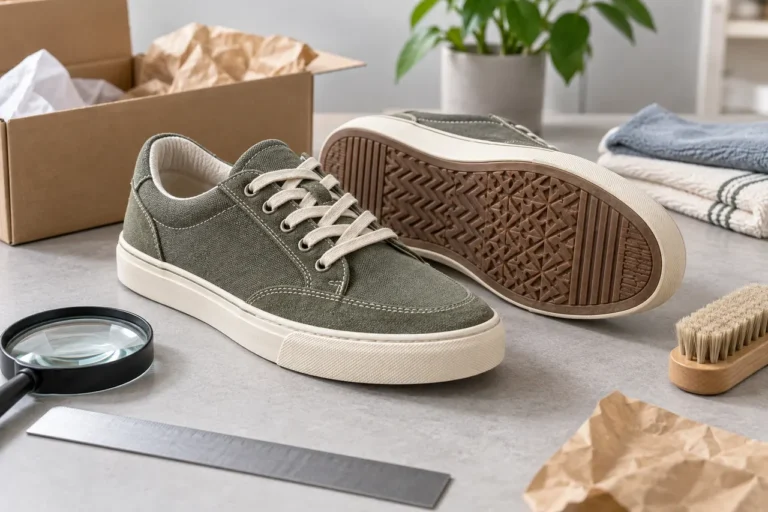
Keeping the shoe box is suitable for situations with clear protection needs or when you want to receive the complete packaging. When recording, you should also write "keep shoe box" and whether extra external protection is needed; do not combine these two decisions into one item.
Removing the shoe box may reduce packaging space, but it should not be directly equated with definite savings. After box removal, other protective materials may still be needed, and it may be affected by package dimensions, billing methods, route restrictions, or platform operational scope. Only when you confirm acceptance of this change and the page or customer service allows execution, mark the status as "box can be removed."
Reinforcement is suitable for packages more sensitive to squeezing, impact, or long-distance transportation risks. Reinforcement may add materials, weight, or volume, so you should record "why reinforcement is needed," such as "worried about shoe box compression" or "extra separation needed when multiple pairs are combined." Do not write "reinforcement" as a guarantee of product integrity.
It is recommended to use mutually exclusive and easy-to-filter statuses:
- Keep shoe box, standard protection
- Keep shoe box, need reinforcement
- Remove shoe box, standard protection
- Remove shoe box, need reinforcement
- To be confirmed, no requirements submitted
Do not modify the decision in the spreadsheet immediately after submission. First check whether the page shows saved, submitted, or other visible status, then update "shipping note submitted" to the corresponding result.✅
Which Cost and Billing Rules Cannot Be Guessed from the Mobile Page
Packaging decisions usually affect the package's volume, weight, protection level, or handling method, but the direction of impact is not fixed. After the shoe box is removed, actual billing may still depend on weighing, volumetric weight, packaging materials, logistics route, and destination rules.
Similarly, keeping the shoe box does not mean a fixed fee is required; reinforcement does not guarantee prevention of shipping damage. General cost explanations in knowledge records can only help understand the total cost composition, not replace the real-time quote for the current order.
Before submission, reconfirm:
- Current destination country or region
- Selected logistics method
- Weight or dimension information shown on the page
- Whether there are customs declaration or other service fees
- Whether there are route restrictions, prohibitions, or special packaging requirements
- The applicable conditions and verification date of the quote shown on the page
Do not reduce costs by under-declaring, splitting orders to avoid taxes, or evading inspections. When involving customs clearance, declare truthfully according to the destination country's requirements and keep necessary order and logistics records.🌍
How to Avoid Mismatched Notes for Multi-Pair Orders
The safest approach for multiple pairs is to establish a unique correspondence rather than relying on image position. Each pair of shoes should simultaneously match visible information such as order identifier, size, or color, and keep an independent row in the spreadsheet.
Before submission, you can perform a "two-way check": first cross-check the website records item by item against the spreadsheet, then return from each spreadsheet row to the website. The objects and decisions obtained from both checks must be consistent. If a row cannot find a corresponding record, or the same record has two different packaging decisions, pause submission and resolve the conflict first.
Do not write multiple decisions as a continuous paragraph, such as "first pair keep box, second pair remove box, third pair reinforce." On a narrow mobile screen, such notes are prone to misalignment due to line breaks, sorting, or page display differences. Line breaks, short sentences, and clear statuses are more suitable for mobile review.
Final Action: Complete Mobile Review Before Submitting Shipping Requirements
Before submission, use your phone to complete the final round of checks:
- The order identifiers on the website record and spreadsheet match
- Each pair of shoes has a clear packaging decision
- Shoe box status and image check results are recorded
- The reason for box removal or reinforcement is clear and within the current executable scope
- The weight, dimensions, quote, and route conditions on the page have not been replaced by old spreadsheet records
- Items requiring customer service confirmation are still marked as to be confirmed
- After submission, reopen the page to confirm the status is saved
Savings cannot be calculated solely based on shoe box decisions; it must be based on the actual billing results of the current order. Keeping the shoe box is usually more suitable for those who value packaging integrity or need extra structural protection; removing the shoe box may suit those who accept packaging changes and have confirmed the platform can execute it; reinforcement suits those who prioritize shipping protection and are willing to bear possible increased material or volume costs.
If you cannot confirm the specific shoe box status, whether the platform supports the corresponding handling, the final billing method, or the correspondence of multiple pairs, it is not recommended to submit that plan. Keep the "to be confirmed" status first and obtain clear answers through the official page or customer service, which is usually more prudent than dealing with mismatches, extra fees, or packaging disputes afterward.
This article only organizes mobile verification methods based on visible official platform materials and provided page screenshot clues. Prices, inventory, shipping fees, taxes, logistics routes, page fields, and packaging handling options may change, so re-verify before publishing.
Agent Platform Shopping FAQ
1. What are QC photos on kakobuy?
Every dropshipping service, including kakobuy, employs a dedicated quality control team. When your goods arrive at kakobuy's warehouse, the team inspects them and takes QC photos. Typically, three photos are captured to verify that the color, size, specifications, and quantity match your order, and they also check for quality problems. However, for electronic products, only the external appearance is checked. If any quality issue is found or the size or color is wrong, the kakobuy team will immediately ask the seller for a return. This process ensures that you receive products of high quality.
2. What can I do if I receive an unsatisfactory item from kakobuy?
You need to contact kakobuy's customer service team right away. For purchases from Chinese sellers, most non-specialty items have a 5-day unconditional return and exchange policy. If you are not satisfied, you can request a return. If the item has already been shipped from the warehouse and delivered to you, and you discover a quality defect, you must reach out to kakobuy's customer service so they can assist you in contacting the merchant to negotiate compensation.
Here are the customer service email addresses for several platforms:
kakobuy: service@kakobuy.com
oopbuy: support01@oopbuy.com
usfans: support@usfans.com
hipobuy: care@hipobuy.com
superbuy: care@superbuy.com
3. How do I assess product quality on kakobuy?
To judge product quality, you should examine the QC photos—don't depend only on factory pictures, as those are usually edited. Use the QC photos to check whether the product meets your detailed requirements before making a purchase decision.
Also remember to steer clear of extremely cheap items, as they tend to have poor quality.
4. Is the kakobuy spreadsheet website safe?
This website does not gather any personal information; it functions only as a product catalog for the kakobuy agent platform. All purchases are processed on the kakobuy platform itself.